






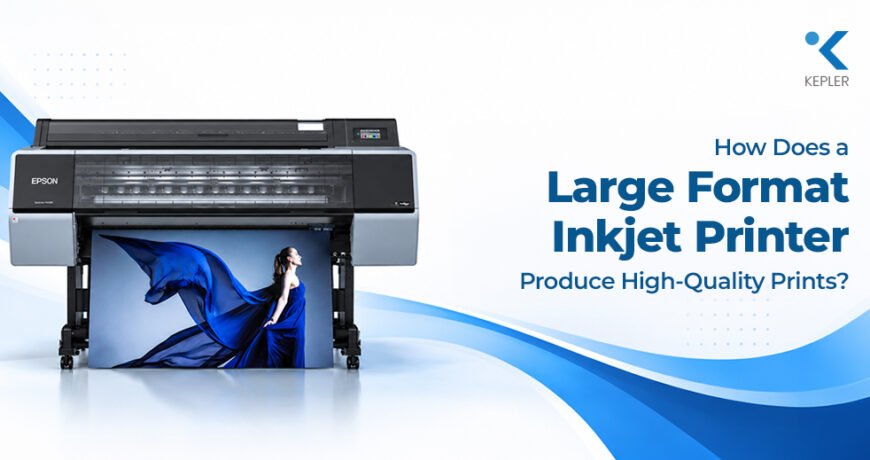
How Does a Large Format Inkjet Printer Produce High-Quality Prints? Leave a comment
When you see a large photograph, detailed architectural drawing, advertising graphic, or fine-art print with sharp details and smooth colours, it is easy to assume that the printer simply uses a higher amount of ink. In reality, producing high-quality large-format output involves several processes working together.
A large format inkjet printer has to control tiny ink droplets, position them accurately, reproduce colours consistently, handle different types of media, and interpret the digital file correctly. The printer’s resolution matters, but it is only one part of the final result.
So, what actually happens between clicking Print and getting a detailed large-format image?
The answer involves the printhead, ink technology, resolution, colour management, media, printer settings, and even regular maintenance. Understanding these factors can also help businesses choose the right large format printer and get more consistent results from the equipment they already use.
What Makes a Large Format Inkjet Printer Different?
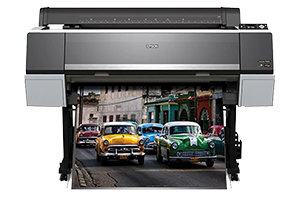
A large format inkjet printer is designed to produce prints that are considerably wider than those produced by typical office printers. Depending on the equipment, these printers can be used for photography, fine art, signage, graphics, technical documents, posters, displays, and other large-format applications.
But producing a large image is not enough. The printer needs to maintain detail and colour consistency across a much larger surface.
This is where precision becomes important.
A professional large-format inkjet printer controls where ink droplets are placed across the media. Modern systems can use sophisticated printheads, multiple ink channels, variable droplet sizes, and advanced image-processing technologies to create smooth transitions and detailed output.
For example, some Epson wide-format printers use PrecisionCore printheads and variable droplet technologies designed to control ink placement with high precision. Epson’s professional models also use different ink configurations depending on whether the intended application is photography, fine art, graphics, or signage.
How Does the Printhead Affect Print Quality?
The printhead is one of the most important components inside a large-format printer.
Think of it as the part responsible for placing thousands of tiny ink droplets onto the printing surface. If those droplets are placed accurately, the printer can create sharp edges, fine details, smooth gradients, and consistent areas of colour.
Modern printheads are designed to control droplet placement very precisely. Some printers can also vary the size of individual droplets depending on the image and printing conditions.
Why does that matter?
Imagine printing a photograph containing a gradual transition from light blue to dark blue. If the printer can control the amount and placement of ink accurately, the transition can appear smoother. If the ink is deposited too heavily or unevenly, the same area may appear grainy or inconsistent.
Epson’s wide-format models, for example, use technologies such as MicroPiezo or PrecisionCore printheads, with some models supporting variable droplet sizes and multiple ink channels.
Epson’s wide-format models, for example, use technologies such as MicroPiezo or PrecisionCore printheads, with some models supporting variable droplet sizes and multiple ink channels.
So, high print quality is not simply about putting more ink onto the paper. It is about putting the right amount of ink in the right place.
Does Higher Resolution Mean Better Large Format Printing?
Resolution is certainly important, but it should not be considered the only factor.
Printer resolution is commonly expressed in DPI, or dots per inch. A higher resolution can allow a printer to reproduce finer details, but the actual result also depends on the printhead, ink, media, image quality, and print settings.
For example, Epson large-format photo printers have offered high resolutions, while newer professional models use different resolution configurations depending on their intended application.
How Does Ink Technology Improve Print Quality?
Have you ever printed an image that looked one way on your monitor but noticeably different on paper?
That is where colour management becomes important.
A digital image contains colour information that needs to be interpreted consistently by the computer, software, printer, ink, and media. Without appropriate colour management, colours can appear too warm, too cool, too dark, too light, or simply different from what was expected.
Professional workflows may use ICC profiles and other colour-management tools to help match the printer, ink, and media combination.
Epson’s professional printing workflows, for example, support colour-management features and media profiles designed to help users achieve predictable output.
This becomes particularly important for photographers, designers, advertising companies, and businesses printing brand materials where colour consistency matters.
How Does the Printing Media Affect the Final Result?
The printer is only half of the printing system. The media can have a surprisingly large effect on the final image.
A photograph printed on glossy photo paper will not look exactly the same as the same photograph printed on matte paper. Canvas, fine-art paper, film, vinyl, and other media can also behave differently when ink is applied.
The surface affects how the ink spreads, dries, reflects light, and interacts with the printed image.
This is why large format printing tips often begin with choosing the appropriate media rather than simply increasing print quality settings.
Professional Epson large-format printers, for example, can support different photographic, fine-art, roll, sheet, and other media depending on the model.
Using the wrong media setting can also affect the amount of ink applied. Selecting the correct media type allows the printer to use settings appropriate to that particular surface.
What Role Do Print Settings Play?
Even a high-end large format printer cannot produce its intended output if the print settings are inappropriate.
Before printing, settings such as print quality, media type, colour management, resolution, and paper size may need to be configured according to the job.
For example, an everyday proof may not require the same quality setting as a final exhibition print. Using the highest setting for every job can increase printing time and ink consumption without providing a meaningful improvement for certain types of output.
Epson documentation also shows that print-quality settings and media-type selections can affect the printing process, with different quality levels available for different requirements.
This means there is no single setting that is automatically ideal for every job.
The right setting depends on what you are printing, what you are printing on, and what level of detail the final output requires.
How Does File Quality Affect Large Format Output?
A printer cannot create image information that does not exist in the original file.
This is an important point when preparing large-format graphics.
If a low-resolution image is enlarged significantly, the printer may reproduce the pixels or interpolation from that file, but it cannot magically recreate the missing original detail.
For photographs and graphics, the source file should therefore be prepared at an appropriate resolution for the intended output size and viewing distance.
The same principle applies to technical drawings. Fine lines, text, dimensions, and other details need to be created correctly in the original file before they are sent to the printer.
This is why high-quality printing is really a combination of good source material and accurate printer output.
Why Is Printhead Maintenance Important?
Even a sophisticated large-format inkjet printer needs regular maintenance.
Over time, ink can accumulate around components, nozzles can become blocked, and print quality can become inconsistent if the printer is not maintained according to the manufacturer’s recommendations.
You might notice:
- Horizontal lines or banding
- Missing sections of an image
- Uneven colour
- Streaks
- Incorrect colour reproduction
- Fine details becoming less clear
These problems do not necessarily mean that the printer itself has reached the end of its useful life.
A nozzle check, printhead cleaning, alignment procedure, or other recommended maintenance process may help identify and address the issue.
Some professional Epson models also incorporate technologies such as nozzle verification and automated maintenance features to help monitor printhead performance.
Regular maintenance is therefore an important part of maintaining consistent quality, particularly when a printer is used frequently.
How Can You Get Better Results From a Large Format Printer?
Buying a capable printer is only the beginning. The way the equipment is used can have a significant impact on the final output.
A few practical large format printing tips can help:
Choose the right media
Use media appropriate for the application and select the corresponding media setting in the printer or RIP software.
Prepare the file correctly
Check image resolution, dimensions, colour space, and other file properties before sending the job.
Use appropriate quality settings
Higher quality can be useful for detailed photographs and fine-art work, but not every job requires the highest available setting.
Use suitable ink and media combinations
Ink and media are designed to work together in specific ways. Always follow the printer manufacturer’s recommendations.
Maintain the printer regularly
Nozzle checks and recommended maintenance can help prevent small print-quality problems from becoming larger ones.
Check colour management
For colour-sensitive work, use the appropriate profiles and workflow instead of relying entirely on default settings.
These steps can help a large format inkjet printer deliver more consistent results without treating maximum quality settings as the solution to every printing problem.
Is an Epson Wide Format Inkjet Printer Suitable for Professional Printing?
An Epson wide format inkjet printer can be designed for different professional applications depending on the specific model.
The Epson range includes systems intended for photography, fine art, graphics, signage, and other large-format applications. Different models use different printhead technologies, ink configurations, media support, and workflow features.
For example, Epson’s professional SureColor range includes wide-format systems with expanded colour ink sets, PrecisionCore printheads, and media-handling capabilities designed around professional printing applications.
However, the right printer should always be selected based on the actual application rather than the brand name alone.
A photography studio, architectural firm, advertising company, and signage business may have completely different requirements.
What Should You Consider When Choosing a Large Format Printer?
If you’re considering a large format printer, don’t focus only on maximum print resolution.
Look at the complete printing workflow.
Consider the maximum media width, supported media types, ink technology, number of ink channels, printhead technology, colour-management capabilities, production speed, maintenance requirements, connectivity, and software or RIP compatibility.
You should also consider your expected workload.
A business producing occasional posters has different requirements from a print service provider producing large quantities of graphics every day. Similarly, a photographer may prioritize colour reproduction and fine detail, while a technical drawing environment may place greater importance on precise lines and consistent output.
Choosing according to the application can help ensure that the printer’s capabilities actually match the work you need it to perform.
Frequently Asked Questions
1. Does a large format inkjet printer produce better quality than a regular printer?
A large format inkjet printer is designed for applications requiring larger print sizes and can offer advanced printheads, ink systems, media support, and colour-management capabilities. However, actual print quality depends on the printer, file, ink, media, and settings.
2. Does higher DPI always mean better print quality?
Not necessarily. Resolution is important, but printhead precision, ink technology, media, colour management, and the quality of the source file also affect the final result.
3. Why does the same image look different on different media?
Different media surfaces absorb and reflect ink differently. Glossy, matte, canvas, and fine-art media can therefore produce different colours, contrast, and overall appearance.
4. How can I improve the quality of my large-format prints?
Start with a suitable source file, choose the correct media, use appropriate print settings, maintain the printer, and use a suitable colour-management workflow.
5. Is an Epson wide format inkjet printer suitable for photography?
Certain Epson wide-format models are specifically designed for photographic and fine-art applications, with features such as expanded colour ink sets and professional printheads. The appropriate model depends on the required print size, media, workflow, and production volume.
6. What causes banding in large-format printing?
Banding can be related to clogged or misfiring nozzles, incorrect print settings, media selection, printhead alignment, or other maintenance issues. A nozzle check and the manufacturer’s recommended maintenance procedures can help identify the cause.
Conclusion
High-quality large-format printing is not produced by one feature alone. A large format inkjet printer combines precise printhead technology, controlled ink droplets, suitable inks, appropriate media, colour management, accurate files, and carefully selected print settings to produce detailed and consistent output.
For businesses using large-format equipment, understanding these factors can make it easier to troubleshoot quality issues and choose equipment that matches their actual printing requirements. Whether the application involves photography, graphics, technical documents, signage, or other large-format work, the complete printing workflow matters.
For businesses looking for large-format printing equipment and professional guidance, Kepler Tech LLC, one of the leading printer suppliers in Dubai and across the UAE, can assist with suitable printing solutions based on specific business and application requirements.