






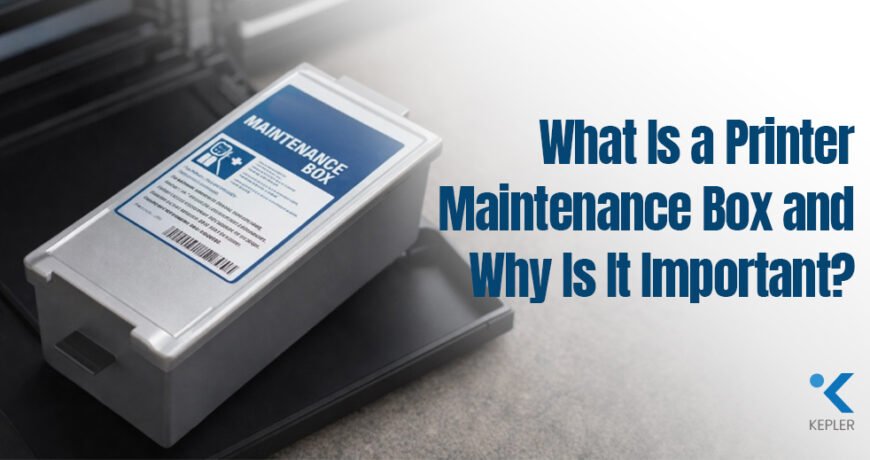
What Is a Printer Maintenance Box and Why Is It Important? Leave a comment
Why Printer Maintenance Matters
Most businesses focus heavily on printer speed, ink quality, and paper selection when trying to improve print performance. However, one of the most important components inside a printer often goes unnoticed: the maintenance box, also known as a waste ink box.
A printer’s performance depends not only on ink and hardware, but also on the maintenance components working silently behind the scenes. Whether it is a busy corporate office handling invoices daily or a creative studio producing high-quality graphics, uninterrupted printing depends on proper internal maintenance systems.
Modern office printer environments demand:
- Consistent performance
- Minimal downtime
- Reliable print quality
This is especially true for organizations using professional office printers and business printing systems, where printers are expected to operate continuously without workflow interruptions.
One of the biggest reasons printers suddenly stop functioning is not damaged hardware or empty cartridges; it is poor maintenance management. Many businesses ignore maintenance warnings until the printer displays an error or stops printing entirely. This can lead to wasted time, emergency repairs, delayed projects, and productivity loss.
That is where a maintenance box becomes important.
A maintenance box plays a critical role in preventing these problems. It safely stores waste ink generated during printer cleaning cycles and protects the printer from internal damage. Although small in size, it is one of the most important components for maintaining printer reliability and long-term performance.
What Is a Maintenance Box?
A maintenance box, also called a waste ink box, is a replaceable waste ink collection unit installed inside many professional printers. Its primary function is to collect excess ink produced during automatic maintenance operations, such as:
- Printhead cleaning
- Nozzle flushing
- Ink priming
Unlike ink cartridges that supply ink for printing, the waste ink box stores ink that is no longer needed by the printer.
Modern printers use advanced printhead technology that requires periodic cleaning to maintain smooth ink flow and consistent print quality. During these cleaning operations, excess ink is flushed out of the system to remove air bubbles, dried ink, and nozzle blockages.
That waste ink needs to be stored safely to prevent internal contamination.
Without a proper waste ink collection system:
- Excess ink could leak inside the printer
- Internal components may become damaged
- Print quality may decline
- The printer’s lifespan could be reduced significantly
One of the best examples of this technology is the Epson Maintenance Box, which is designed to support long-term printer reliability in both office and commercial printing environments.
Especially in high-volume workplaces where printers operate continuously throughout the day, a properly functioning waste ink box becomes essential for maintaining uninterrupted performance.
How a Waste Ink Box Works
Understanding how a waste ink box works helps businesses realize why it is essential for printer health and print consistency.
Every modern printer performs automatic maintenance routines to keep the printhead functioning properly. During these routines, excess ink is pushed through the printhead system to clean dried ink and maintain nozzle performance.
The maintenance process typically includes:
- Printhead cleaning cycles
- Ink flushing during startup
- Deep cleaning operations
- Borderless printing maintenance
Instead of allowing this waste ink to remain inside the printer, the system redirects it safely into the maintenance box.
Inside the box are highly absorbent pads designed to store waste ink securely without leakage. Many professional printers automatically monitor how much waste ink has been collected and notify users when replacement is required.
This automated maintenance system helps:
- Prevent printhead clogging
- Maintain ink consistency
- Improve print reliability
- Protect internal printer hardware
Some users believe the printer is “wasting” ink during cleaning cycles. In reality, the printer is protecting itself. Regular cleaning is essential for maintaining professional print quality and preventing costly printhead issues.
Why Maintenance Boxes Are Important
1. Prevents Waste Ink Overflow
One of the most important functions of a waste ink box is preventing excess ink from accumulating inside the printer.
Without proper waste ink collection, printers may experience internal ink leakage that can damage sensitive components and create major operational issues. A high-quality maintenance box safely absorbs and stores this excess ink before it becomes a problem.
This protection is especially important for businesses using printers daily for high-volume printing tasks.
2. Protects Internal Printer Components
Modern printers contain highly sensitive internal parts, including:
- Sensors
- Printheads
- Belts
- Rollers
- Circuit boards
If waste ink spreads inside the printer, these components can become damaged or unstable. Internal ink contamination may eventually lead to hardware failure and expensive repairs.
Reliable maintenance systems, such as the Epson Maintenance Box, help maintain hardware stability by keeping waste ink isolated from critical internal systems.
In many cases, replacing a low-cost waste ink box can prevent repair costs that are far more expensive than the printer consumables themselves.
3. Maintains Print Quality
Print quality depends heavily on healthy printheads and proper ink flow.
If the maintenance box becomes full, the printer may stop performing cleaning cycles correctly. This can lead to several common print problems, such as:
- Clogged nozzles
- Streaks and banding
- Faded colors
- Missing print lines
- Inconsistent output quality
For businesses producing client-facing documents, marketing materials, or graphics, maintaining professional print quality is extremely important.
Organizations using professional office printers often rely on consistent printing performance to support daily business operations without interruptions.
4. Reduces Printer Downtime
Unexpected printer downtime can disrupt productivity and delay important work.
When a maintenance box reaches capacity, many printers automatically stop functioning to prevent internal damage. This safety feature protects the printer but can interrupt workflow if replacement is delayed.
Replacing a waste ink box usually takes only a few minutes, while ignoring maintenance warnings could result in days of service downtime or expensive repairs.
For busy office environments, proactive maintenance helps ensure uninterrupted printing and improved operational efficiency.
Signs Your Maintenance Box Needs Replacement
Most modern printers are designed to notify users before the maintenance box becomes completely full.
One of the most common signs is an on-screen warning message, such as:
“Maintenance Box Near End of Service Life”
Users may also receive alerts through printer monitoring software on Windows or Mac systems.
In some cases, print quality may begin to decline because the printer limits cleaning operations when the waste ink box approaches capacity. Businesses may notice:
- Streaks on prints
- Faded colors
- Inconsistent print output
- Cleaning cycles are becoming less effective
Eventually, the printer may display a replacement message and stop printing entirely until a new maintenance box is installed.
These alerts should never be ignored because they are designed to prevent internal damage and protect printer performance.
Risks of Ignoring Maintenance Box Warnings
Ignoring maintenance box warnings can affect both printer performance and business productivity over time.
When the waste ink box reaches full capacity, printers are designed to temporarily stop certain functions to protect internal components from waste ink overflow. This safety mechanism helps prevent serious hardware damage and maintains long-term printer reliability.
Without timely replacement, businesses may experience interruptions in:
- Printing
- Scanning
- Copying
In some cases, continued operation without replacing the maintenance box may lead to:
- Clogged printheads
- Dried ink buildup
- Inconsistent print quality
- Internal ink leakage
- Reduced printer lifespan
The good news is that these issues are easily preventable with proactive printer maintenance and timely replacement of the waste ink box.
A simple replacement can help businesses avoid unnecessary downtime, maintain smooth workflow operations, and protect the printer from costly repairs.
How Genuine Maintenance Boxes Improve Printer Performance
Using genuine maintenance products is important for maintaining printer reliability and long-term performance.
Original maintenance boxes are designed specifically for printer firmware, sensors, and waste ink systems. This ensures proper compatibility and accurate waste ink monitoring.
Among the available options in the market, the Epson Maintenance Box is widely recognized for its reliable waste ink absorption, compatibility, and leak protection in professional printing environments.
Counterfeit or incompatible waste ink boxes may cause problems such as:
- Incorrect ink level detection
- Leakage inside the printer
- Premature error warnings
- Poor waste ink absorption
Businesses should always purchase consumables from trusted suppliers to ensure product authenticity and maintain warranty protection.
Reliable maintenance components help optimize cleaning cycles and improve overall printer stability.
Industries That Benefit Most from Proper Printer Maintenance
Many industries rely heavily on uninterrupted printer performance and consistent output quality.
Corporate Offices
Daily printing operations involving invoices, reports, and contracts require stable printer performance without downtime.
Photography Studios
Professional image printing depends on accurate colors, healthy printheads, and smooth ink flow.
Print Shops
High-volume production environments cannot afford unexpected printer failures during critical jobs.
Educational Institutions
Schools and universities handle continuous printing workloads involving exams, assignments, and administrative documents.
Design Agencies
Creative businesses require consistent color output and high-quality printing for branding and client approvals.
Proper printer maintenance helps all these industries maintain productivity and reduce operational disruptions.
Tips to Extend Printer Lifespan
Maintaining printers properly can significantly improve durability and print performance over time.
Some important maintenance practices include:
- Running regular nozzle checks
- Using genuine consumables
- Replace the maintenance box before it becomes full
- Powering off the printer correctly
- Updating printer firmware regularly
Businesses should also keep a spare waste ink box available to avoid unexpected workflow interruptions.
Using genuine products supplied by trusted printer consumable suppliers helps reduce compatibility issues and ensures more reliable printer operation.
Common Maintenance Mistakes Businesses Make
Many printer problems are caused by poor maintenance habits rather than hardware failure.
One of the most common mistakes is ignoring warning notifications until the printer stops working completely. Businesses often delay maintenance because the printer still appears functional.
Another major issue is using counterfeit consumables to reduce short-term costs. Cheap alternatives may leak, provide inaccurate readings, or damage internal components.
Another major issue is using counterfeit consumables to reduce short-term costs. Cheap alternatives may leak, provide inaccurate readings, or damage internal components.
Attempting to bypass maintenance warnings using unofficial reset methods can also create serious hardware risks and void warranty protection.
Proper maintenance practices are essential for maintaining printer reliability and long-term performance.
Future of Smart Printer Maintenance
Printer maintenance technology is becoming more intelligent and automated.
Modern printer systems are increasingly using predictive maintenance features that monitor printer health in real time. Future maintenance systems may automatically notify businesses before issues occur.
Advanced technologies now include:
- AI-based printer monitoring
- Automated maintenance alerts
- Cloud-based device management
- Remote diagnostics
- Predictive consumable tracking
These innovations help businesses reduce downtime and improve operational efficiency.
Modern printers are becoming smarter at predicting maintenance needs before failures occur, helping organizations maintain uninterrupted productivity.
FAQs
1. What does a maintenance box do?
It collects waste ink generated during printer cleaning and maintenance cycles.
2. . Is a maintenance box the same as a waste ink box?
Yes. Both terms refer to the same printer component that stores excess ink produced during maintenance operations.
3. How do I know my maintenance box is full?
Your printer will display warning notifications through the printer screen or monitoring software.
4. How often should a maintenance box be replaced?
Replacement frequency depends on printer usage and cleaning cycles. High-volume environments may require more frequent replacement.
5. What happens if I ignore maintenance box warnings?
The printer may stop functioning temporarily to prevent internal ink damage and waste ink overflow.
6. Does the maintenance box affect print quality?
Yes. A full waste ink box may prevent proper cleaning operations, which can affect print quality and nozzle performance.
7. Are genuine Epson Maintenance Boxes important?
Yes. Genuine products ensure proper compatibility, reliable waste ink absorption, and safer printer operation.
Conclusion
Printer performance depends on more than just ink cartridges and print speed. Proper internal maintenance plays a critical role in protecting printer reliability, maintaining print quality, and reducing unexpected downtime.
The maintenance box, also known as a waste ink box, is one of the most important components supporting long-term printer performance. By safely collecting waste ink generated during cleaning cycles, it helps prevent internal damage, protects printheads, and ensures smoother printer operation.
Whether used in corporate offices, photography studios, educational institutions, or print production environments, proper maintenance helps businesses improve productivity while reducing costly repair risks.
Replacing a waste ink box on time is a simple step that can significantly extend the printer’s lifespan and maintain consistent print quality.
For businesses looking for genuine Epson consumables and reliable printer support, Kepler Tech LLC, one of the leading authorized Epson dealers in Dubai and across the UAE, provides trusted solutions for printer maintenance and professional printing requirements.